Websites for Therapists: The Complete Guide 2026
Before we talk about platforms, page structures, or SEO — we want to share how we think about therapist websites. Because most of what's written on this topic treats a website like a digital brochure. We've never seen it that way.
Your website is where you begin building a relationship with your future clients. Someone searching for a therapist is often in one of the most vulnerable moments of their life. They're scared. They're not sure therapy will help. They're not sure you'll understand what they're going through. Your website is your first chance to meet them there — to say, without words, I see you. I know what you're carrying. You're in the right place.
Think of your website as the first step in informed consent. Before a client ever sits across from you, your website can prepare them for what it's like to work with you — your approach, your values, what to expect, and who you are as a human being, not just a clinician. Done well, it instills hope. It compels someone who has been sitting on the edge of reaching out to finally make the call.
That's what we're helping you build here. The practical stuff — platforms, page structures, SEO — all of it is in service of that goal.
What to Know Before Building Your Private Practice Website
Here's what you need to know, whether you DIY or hire someone, so that you don't waste time, money, or energy.
Your website is a reflection of how you want to change the world, who you want to reach, and the foundation of your business. If you aren't clear on who you are as a therapist, your business plan, or your marketing message, you're going to end up with a website that doesn't reflect you, doesn't reach your ideal clients, and doesn't support your practice.
Think of it this way: your website is like a house. The design is what it looks like, the colors, the layout, the images. The SEO and marketing strategy are the plumbing and electricity running through the walls, invisible but essential. YOU are the well the whole thing draws from. We've seen therapists spend thousands on a beautiful house with no running water. It sits there looking lovely and doing nothing.
Before you build anything or hire anyone get clear on these:
What kind of clients do you really do exemplary work with?
What kind of clients do you enjoy working with, even when it's hard?
What's the last straw that led your ideal clients to search for a therapist?
Why did they choose you — or why will they?
How do your clients describe that work and those outcomes in their own words?
Who are you as a therapist — what makes you genuinely different?
How do your clients describe you? (There's a reason personal referrals convert so well — other people often describe who you are better than you do.)
Why a Website Designer Can’t Do it All For You
The only person who can figure out your message, your people, and your voice is you. A designer can make it beautiful. A developer can make it work. But neither of them can tell your ideal client that you understand what they're going through, only you can do that.
The answers to those questions above will determine how the website looks, what it says (expect to pay $3–10k if you hire someone to write your entire site), and whether it actually functions as a client-generating tool. Without that clarity, even the most gorgeous website will sit there like a beautiful house with no plumbing.
In this guide, we'll give you the go-ahead to start a DIY website even if you aren't sure of all the answers yet. But do not pay a website designer until you have clarity on your message and your people. You'll end up frustrated, behind on content deadlines, and with a website that looks great but doesn't connect.
What Pages Does a Therapist Website Need?
Before you think about platform or design, know what you're building. A therapist website doesn't need to be complicated but it does need to include the right pieces. In fact with our template that we give therapists in our Business School for Therapists, we start out with a single page website, so you can be launched in a week. After that you can add on the other pages.
🏠 Home page Your first impression. Who you help, what you do, and a clear call to action. This is where hope begins or doesn't.
👤About page Who you are as a person and a therapist. Clients hire YOU. Let them get to know you before the first session. Empathize with the struggle of finding the right therapist and let them see YOU and what you do!
💬 Services or Specialties pages What you offer, who it's for, what to expect. This is informed consent in action, set expectations clearly so clients arrive ready. Every page needs it’s own FAQ too!
📬 Contact page Don't make a vulnerable person hunt for how to reach you. One click from anywhere on your site. Make sure if you have a contact form on your site it’s HIPAA compliant!
📝Blog Your SEO engine and your voice. Even a handful of posts on topics your ideal clients are searching will bring people to you. Build the capability now, even if you don't post yet.
REMEMBER: You don't need all of these at launch. A single-page website with your name, what you do, who you help, and how to contact you is infinitely better than a six-page website that's still six months from publishing. Start small. Publish. Grow.
Your Website as a Relationship and a Responsibility
The person who finds your website isn't a lead. They're a human being in the middle of a hard moment, trying to figure out if you're the right person to help them through it.
Most therapist websites get this backwards. They lead with credentials, list modalities in clinical language, and make the visitor work hard to understand what working with this therapist would actually feel like. The client arrives looking for hope and finds a résumé.
Your website copy should do three things:
Show them you know what they're going through. Not in general terms — specifically. The sleepless nights. The way they've been managing just fine on the outside. The thing they haven't been able to say out loud yet. When a potential client reads your website and thinks "how do they know?" That's when the relationship begins.
Give them a clear picture of what therapy with you is actually like. This is the informed consent piece. Before someone ever sits across from you, your website can help them understand your approach, what sessions look like, what they'll be asked to do, and what change might feel like. That preparation reduces anxiety, increases engagement, and strengthens the therapeutic relationship before it formally begins.
Instill hope, the kind that says: you don't have to keep feeling this way, people do heal from this, and here's evidence that the work is possible. That's done through your words, your stories, your honesty about the process.
This changes how you write
Write to one person, not everyone. Write the way you speak in session and not clinically. Stop trying to convince and start trying to connect. Your website isn't a sales page; it's the beginning of a therapeutic relationship. We have a free training on exactly how to write this kind of therapist website copy — get it here.
And a note on what breaks this: clinical jargon distances rather than invites. A website that makes it hard to contact you, buried phone numbers, broken forms, no clear next step tells a vulnerable person that you're not accessible. A website that's fundamentally about your credentials and training rather than your client's experience misses the point entirely. Your credentials matter but lead with connection first.
Representation, Language, and Accessibility
A website that instills hope can only do that for someone who sees themselves reflected in it. This is something we feel strongly about and want to name directly.
Representation in your imagery
Look at the images on your website. Who is pictured? Do your ideal clients in all their diversity of race, body, age, ability, family structure, and identity see themselves there? Stock photography has improved, but it still defaults heavily toward certain bodies and certain kinds of people. Be intentional. If a person from a marginalized community lands on your website and sees no one who looks like them, you've already communicated something even if it wasn't what you intended.
Plain language
Read your website copy out loud. Does it sound like you, like a real person talking to another real person? Or does it sound like a clinical intake form?
Decolonized language in this context means language that doesn't pathologize people, doesn't center a particular cultural lens as the default, and doesn't require a graduate degree to understand. It means:
Plain language over clinical terminology — "feeling overwhelmed and disconnected" over "affect dysregulation"
Describing experiences, not diagnosing them because your website isn't an assessment tool
Examining whose experiences and whose ways of understanding distress are centered in the language you use
Removing assumptions about family structure, relationship models, spirituality, and what a "normal" life looks like
It's about making sure the door to your practice is actually open to the people you want to serve.
Accessibility
At zynnyme, we are committed to providing universal access to all of our content and we believe every therapist should hold the same standard for their own website. Accessibility isn't optional. It's an ethical practice and in many states, a requirement.
Non-negotiables for an accessible therapist website:
Alt text on all images — every image should have a description for screen readers
Readable font sizes and color contrast — small light-gray text on white is not accessible; test your contrast ratios
Closed captions on any video content — this serves Deaf and hard-of-hearing visitors, non-native speakers, and anyone in a quiet public space
Screen reader compatibility — use heading structures (H1, H2, H3) properly so screen readers can navigate your content
Keyboard navigability — everything on your site should be reachable without a mouse
Plain language — which also improves accessibility for people with cognitive differences, reading disabilities, and anyone who isn't a native speaker
Squarespace includes built-in accessibility features and WCAG compliance tools that make this significantly easier to maintain than some other platforms. It's one more reason it's our recommendation for therapists.
Website Vocabulary for Therapists
Okay, for some of you this is going to be easy-peasy to scan through and make sure you’re on track. And for others, you’re going to find yourself glazing over. Feel free to take breaks. We pinky-promise — all of the vocabulary we’re giving you here will help when building your ideal therapist website, whether that involves a professional designer or DIY project start to finish. For a deeper dive on terms, see our Website Dictionary for Therapists.
Website
A website is simply a page you access through the Internet that allows anyone, anywhere to be able to read the same material in the same format. Have you ever had a Word document for PC that your friend couldn't open because they had a MAC? Or not been able to open an old WordPerfect document? Webpages are meant to resolve this issue and provide a universal language all computers can read. The primary purpose of a website is to allow anyone, anywhere to easily access the same material and see the same thing.
Blog
"A blog is a website, but a website isn't necessarily a blog." A blog is a way to create a collection of articles. It’s a pre-made format or template that allows you to create articles or posts over time within your website. Blogs allow you to easily organize posts by date, topic, keyword, or category. Most blogs are a specific format that can easily be read by search engines and shared, accessed, and curated through something called an RSS feed (more on that later).
Many therapists assume a blog is separate from your website, but in most cases, a blog integrated into it is the best solution. In fact, we recommend every therapist website to have great blog capabilities even if you don't think you’ll ever need them. Getting a site without a blog would be like paying to "upgrade" your car to take out power steering... it’s silly!
Mobile & Responsive DesignWebsites
As people started carrying computers in their pockets in the form of smartphones and tablets, the language of the internet has needed to catch up. Many sites that haven't been updated in a few years aren't accessible on mobile phones. And yet, around 60% of views of the site you’re on right now are from mobile phones, and this is a pretty common percentage that’s increased from 30% just a few years ago.
Many website builders now integrate the mobile website language — but not all of them. If you don't choose the right place (or way) to build your site, you could end up losing 60% of potential clients. You used to have to pay someone an additional fee to build a separate mobile site, but that’s mostly been eliminated due to responsive design.
Responsive Design
This is related to the same concept as mobile websites. Responsive design is a process built in by computer programmers that allows the design to adjust no matter what size of a screen someone is using to view your site. If you want a visual of what that might look like and are familiar with the process, change the size of this browser window. Drag the width of the browser window slowly and see how things shift around until you can see the same thing someone would see if they were looking at this site on a mobile phone.
Responsive design automatically adjusts your layout for any screen size. Every modern website builder includes this, but verify before you commit to any platform. If your website doesn't work beautifully on a phone, you're invisible to the majority of your potential clients.
Website Platforms and Content Management Systems
There are many different ways to build your website. Choosing a place to build your website is kind of like choosing between Microsoft Word and WordPerfect or whether you want an iPhone or Android. Many of them may have similar features, but they’re NOT all created equally!
Modern content management systems can easily incorporate a navigation menu into your site and keep everything perfectly spaced as you add more pages. They make updating, tweaking, or expanding your site as simple as creating a PowerPoint presentation or Word document.
Content management system (CMS) examples include Squarespace and WordPress.org. WordPress.com is a self-publishing website builder platform and not a CMS.
But before any platform or CMS existed, websites had to be hardcoded with HTML.
Hardcoded HTML Sites
When websites were first developed, each one was written using a special language. In order to build a site, you had to learn HyperText Markup Language (HTML) or hire someone who was already familiar with it. And updates could be time-consuming and expensive! Now, websites can be built and updated similar to how you might use PowerPoint or Word.
Hardcoded websites are the most expensive to build, maintain, and update. There are still designers out in the world who prefer to create them, and when choosing one, be sure to clarify what platform they’ll be building on and determine if it meets your needs.
WYSIWYG
This is a funny little term that stands for "what you see is what you get." It’s a feature of certain content management systems that means what you see as you’re working on your site is what your visitors will see.
WordPress.org, for example, is NOT a WYSIWYG platform unless you have extra plugins. For therapists who aren't tech-native, this difference significantly affects how easy your site is to maintain over time.
Website Hosting
Hosting is the service that keeps your website's code running 24/7. Some platforms include hosting (Squarespace does). Others require you to purchase it separately (WordPress.org does). Choose a host that takes security seriously. A hacked website doesn't just affect you — it affects your clients' trust in you.
Domain Name
A domain name is like a phone number. It’s what people type in to access your site. Like your home or mobile phone number, domains can be pointed to any website. Your domain name is a piece of your branding and determines how easy (or difficult) it is to reach your site.zynnyme.com, for example, is easier to type in than the fictional we-are-zynnyme .com.
Some platforms may also register a domain name for you. Others may require you to buy your domain name elsewhere. And some platforms actually purchase the domain name you want in their own name and sell it back to you if you decide to leave. Having a domain name that’s easy to spell, type, and remember is quite useful.
Hover.com is our FAVORITE place to buy domain names because they answer the phone and resolve issues quickly. Some domain registrars (that’s the fancy name for anyone who can sell you a domain name) charge you for silly things like keeping your home address private — but Hover doesn't do that.
Your domain name should never cost more than $15–20 a year — and it should always be registered in your name, not a designer's.
Squarespace
Squarespace.com is a website and blogging platform. It includes hosting, blogging, WYSIWYG editing, customizable themes, integrated plugins, customer service, and domain registration (for annual service purchases). You’re looking at a Squarespace site right now.
We like the drag-and-drop functionality and our beautiful, modern, responsive website that can easily be tweaked and changed as our needs evolve. Squarespace ensures our site is backed up in different places, and its templates allow us to change site colors, fonts, and images with the ease of the drag-and-drop builder.
WordPress.org
This is a TOUGH one for therapists to conceptualize. "WordPress" in the vernacular often refers to WordPress.org, which is a free piece of open-source software you can download and install for your website hosting system. Some web hosting centers even have 1-click installs of this CMS. And since WordPress.org is open-source software, anyone can see what’s under the hood, so developers are constantly working against hackers to keep the software safe and secure.
WordPress.org requires ongoing security updates to keep your site working and minimize the risk of hacking. You must research, choose, install, and update standalone pieces of software (plugins) to allow for auto-updates and backups of your site. You’ll need to pay for a website theme that will have limitations in terms of design, choose plugins, do security updates, and consistently ensure all of these things are securely and effectively working together.
Are your eyes glazing over? If so, we get it. Most therapists who choose this route will need to get outside training and/or pay for ongoing support to keep their website up to date. This is also why you might consider getting a web designer to set things up properly for WordPress.org.
WordPress.com
This platform is something completely different. WordPress.com is a website builder that starts as a free service and is essentially a stripped-down version of the WordPress.org CMS.
We've consistently found our clients get frustrated with the limitations as they attempt to expand the effectiveness of their site. Some of the coolest free tools we use on the zynnyme site can't be used on this platform. We also think it’s interesting that as you start to turn on different features, many therapists spend more annually than they would on other platforms.
Export and Import
This is when you take your website and attempt to suck everything out so you can "import" it elsewhere. Some blog platforms need to be exported in a manual backup and then uploaded to the new location manually. And some systems allow you to simply login to your old account for a 1-step export/import.
You can import a WordPress site into Squarespace and vice versa. However, the "look" of the site and any custom coding won't transfer back and forth. Both WordPress and Squarespace allow you to import many blogs on standalone sites like WordPress.com, Blogger.com, and others.
If you have an established blog, definitely check to see if you can import it easily into your new website. It can save a lot of time and energy!
SEO
Search engine optimization, or SEO, ensures your website is set up (optimized) so that the little internet gremlins — that might not be the official name — understand what you do so they can show your website to people who will really benefit from it.
Some website platforms have major limitations when it comes to SEO. WordPress and Squarespace both have extensive options for setting up your site in a way that ensures it’s findable online… but the real questions are: What do you want to be findable for? Who do you want to find you? What are those people typing into Google?
A few technical things your platform needs tp include are a blog integrated into the system, the ability to write descriptions for each page on your site, and proper backend details. For WordPress, this involves getting a free plugin like Yoast SEO that helps you ensure your site is properly set up.
However, no platform will make you magically appear on the first page of Google for every search term on the planet. You need to clarify what you want to be found for, what people are typing in, and how many times they’re typing it per month (is there enough demand?). You need to write relevant, compelling content that people want to read once they find your site.
Website Designer
A website designer is a professional who designs the look of your site. They’ll ask you questions about how many pages you want, the colors, your brand, and your clients. In most cases, they require you to choose a look for the website, provide inspiration websites, and send over all the images, headshots, and copy you want included.
Website designers might offer services like developing the website (making it functional and establishing the design) and choosing stock images for you — they may or may not have you purchase those directly for an additional cost. These professionals don’t often integrate anything related to SEO and making your website findable on search engines.
Website Developer
If you have a traditional designer, the developer is the person who will translate the pretty design into your website platform to make it all work the way it was envisioned.
Copywriter
This is the person who writes your website for you, but it’s seldom written with SEO in mind. And, with 25 years of combined experience, we’ve seen that most copywriters have NO idea how to write for therapy websites. What we do is different and specialized and hard to outsource.
SEO Specialist for Therapists
An SEO specialist is someone who can help you study what’s being searched for in your area and where you’re currently showing up on those searches and make a plan to get you to Page 1 for particular search keywords.
Notice we were specific in saying SEO specialist for therapists. That’s because this is one of the biggest areas where we’ve seen therapists taken advantage of in paying really high monthly fees, getting reports they don’t understand, and being misled by professionals. With a SEO specialist for therapists you are getting a person who understands the market for mental health services and is well versed in what is important to you the therapist and the client, when it comes to searchability.
A great SEO specialist shouldn’t just focus on you showing up on Page 1 for as many keywords as possible. Of course, you’re likely to get on the first page for your name, but you want to be there for people who’ve never heard of you and who need the services you offer, too!
We have some resources to find trusted SEO providers for therapists in the resource list below.
Why Thriving Therapists Always Start with DIY
Here's the thing about building your website yourself first: it's not about doing it perfectly. It's about getting enough down on the page that you know what you're building before you pay someone to build it for you.
Think of it this way, if you were going to give a talk and needed slides, would you hire a designer before you'd written the speech? No. You'd write the outline first, put together a rough draft, and then bring in a designer to make it shine. That's exactly what we encourage with your website.
You don't have to learn code. You don't have to download anything. Modern website builders are not much more complicated than PowerPoint. Start with words on a page in a basic format. Get it out there. Your ideal clients need to find you now — not in six months when everything is perfect.
Roadblocks Therapists Hit Before Launching Their Website
Having a website is a vulnerable experience. It means being seen. Being seen means opening yourself up to judgment and misunderstanding. This is often where therapists get stuck — not because they don't know how to use the platform, but because being visible is genuinely scary.
We believe in progress, not perfection. Your website today will not be the same website you have five years from now. Waiting for the perfect words is often just another form of self-sabotage from being seen — and the people who need you are out there searching right now.
There are also real, specific fears for therapists from marginalized communities — therapists who fear further discrimination or harm from being visible online. We see you, and we want your website to be a place where you are reflected so the people who would most benefit from working with you can find you and feel safe reaching out.
Don’t wait for the first session for a client to get to know you. Allowing them to get to know you and your therapy style from the beginning of your marketing will reduce stress and strengthen the level of attunement in the first session. Your website is part of the therapeutic process in connecting with the client before the first session.
You don't need a logo to launch. You need a clear message, a call to action, and a simple way for people to contact you. If you want a professional headshot on a budget, Shoott.com can get you there for around $15 in most major cities. A real photo of your real face builds more trust than any logo ever will.
Best Website Builder for Therapists
We have some pretty strong feelings when it comes to website options for therapists based on over 30+ years of combined coaching experience. We know therapists VERY well (heck, we are therapists). We coach them in groups and 1:1, and we’ve worked with thousands of therapists from around the world from rural areas, big cities, solo and group practices, and Beyond the Couch practices (businesses that have multiple streams of income like online courses and books).
What therapists need in a website is the following:
Simple to design and maintain — without a developer on call
Customizable so it actually reflects you and your practice
Expandable as your practice grows and changes
Built-in SEO tools so it can be found online
Strong blogging functionality — your primary SEO engine
Secure by default — without requiring you to manage it
Accessible features built in — so you can meet your ethical obligations
Easy analytics so you can make informed decisions
Our recommendation is Squarespace. It meets all of these criteria, it's what we use for zynnyme, and it's what we've helped hundreds of therapists around the world build their practices on. We're not affiliates. We just know what works.
For a full breakdown of why — including a comparison with other platforms — read our dedicated post: Best Website Builder for Therapists: Our Honest Recommendation.
Website Builders for Therapists: Alternatives to Squarespace
WordPress.org
Powerful and infinitely customizable — which is also what makes it the wrong choice for most therapists. It requires ongoing maintenance: security updates, plugin management, theme updates, backups. Small design changes can require expensive developer time. A designer will tell you they can do anything with WordPress — what they won't tell you is the cost to maintain it is significantly higher over time. If you're on WordPress and it's working, no urgent reason to switch. Starting fresh? We'd point you to Squarespace.
WordPress.com
More secure than WordPress.org, but with limitations that consistently frustrate therapists as their practice grows. Starts free, but costs add up quickly as you enable the features you actually need — often ending up more expensive than Squarespace with fewer capabilities.
Wix
Significantly improved in recent years and a more legitimate option than it once was. Still not our first choice for therapists — its blogging and SEO tools, while better, don't match Squarespace for a content-driven practice. If you're already on Wix and it's working, no urgent reason to switch.
GoDaddy
Convenient for combining domain registration and hosting in one place, but its website builder has significant limitations in design flexibility and SEO compared to Squarespace.
What About AI Website Builders?
AI-assisted website builders — including Squarespace's own AI tools, Wix ADI, and various standalone generators — have improved dramatically and can produce a functional website structure quickly.
Our take: AI tools are a useful starting point, not a replacement for knowing your own practice. An AI can generate a layout and suggest copy structure. It cannot know your niche, your voice, your ideal client, or what makes you different as a therapist. Use AI to break through the blank-page problem — then do the real work of making it sound like you and speak directly to the people you want to serve.
Platform recommendation doesn't change: Squarespace's AI tools are integrated natively and work well. If you're going to use AI assistance, doing it within Squarespace keeps everything in one place.
The Importance of Being Able to Adjust Your Website
Whether you DIY or hire a designer, you need to be able to make changes to your website yourself — or have someone available who can do it quickly and affordably.
Your practice evolves. You'll update your specialty, change your fee information, add a new service, shift your niche. If every small update requires a developer invoice, your website becomes a liability rather than an asset.
If you work with a designer, protect yourself:
Retain ownership of your domain name — registered in your name, not theirs
Get login access to your own website and hosting account
Get a handover document explaining how to make basic updates yourself
Understand what ongoing maintenance (if any) will cost you
The Truth About Free Websites for Therapists
There's no such thing as a truly free website — there's always a trade-off. Free website builders typically display the platform's branding on your URL, limit SEO capabilities, restrict custom domains, and cap storage and features in ways that become frustrating quickly. The moment you turn on anything meaningful, most "free" platforms cost as much as Squarespace — without the quality.
A professional website is one of the highest-ROI investments in your practice. At approximately $23 a month for Squarespace, you'd need to attract roughly one extra client per year for it to pay for itself many times over.
Here Are the Best Therapist Websites of 2026!
We love to share therapist websites that aren’t just pretty but also effective! So, what does that actually mean? It means they’re…
Showing up on Google searches for high-value keywords.
Resulting in ideal clients scheduling free consultations.
Making things EASY for clients, staff, and the owner (you!).
Turning the flow of private practice clients on/off with ease.
Providing a responsive and accessible experience for everyone.
Leading to a business that’s profitable, sustainable, and enjoyable.
No matter how beautiful your website is, if it isn’t doing those things, what’s the point?
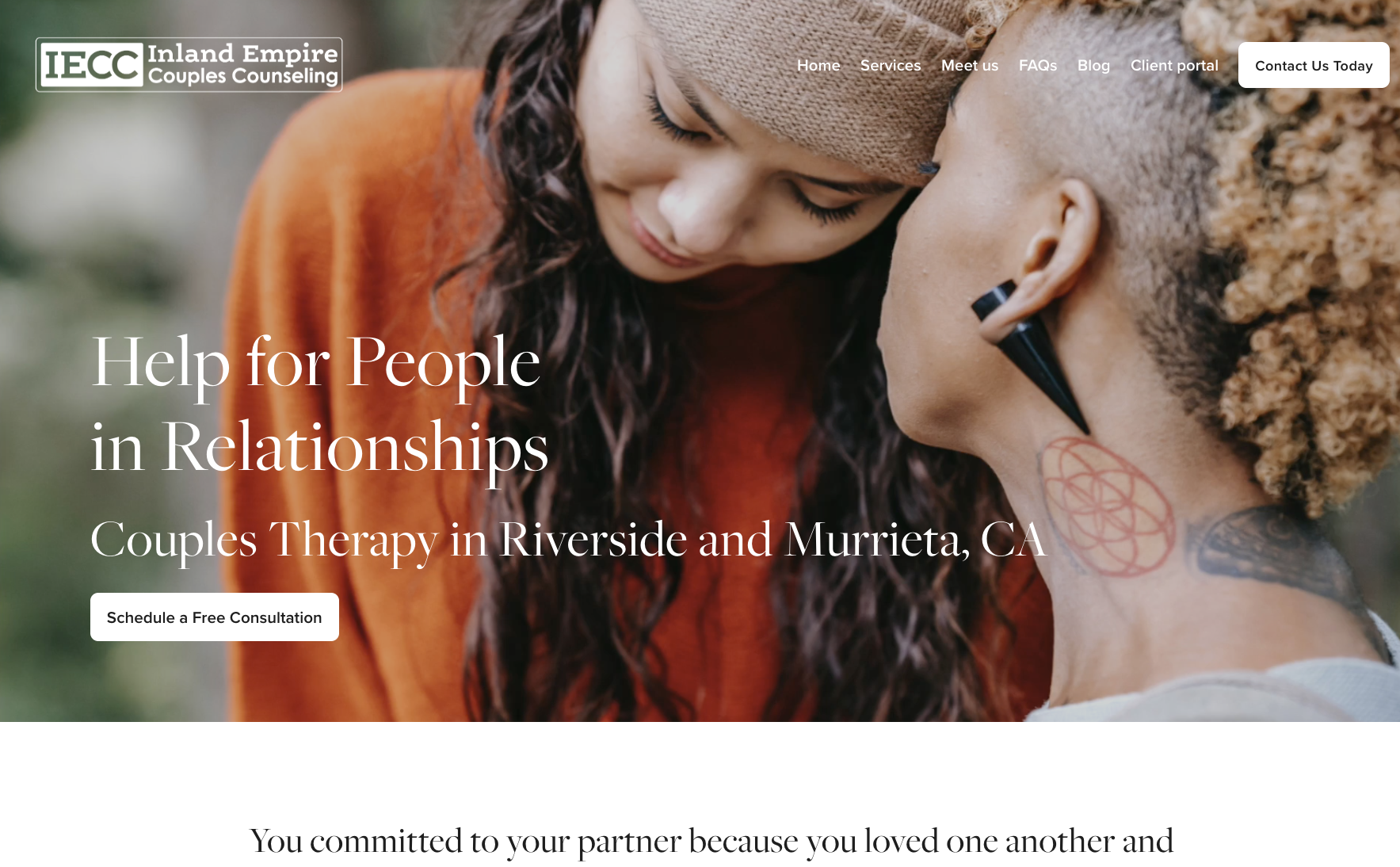
Inland Empire Couples Counseling: This is an example of a website that originally was built using our template that we give people in our Business School for Therapists. Later, a website designer was enlisted to spruce up the branding of this site, but this website was written by the private practice owner, keywords were researched by them as well and the SEO was done by them. Yes it looks nice, but the copy is connecting and transformational. The website ranks and converts so the practice is able to fill their employed clinicians for regular sessions, including intensives and groups.
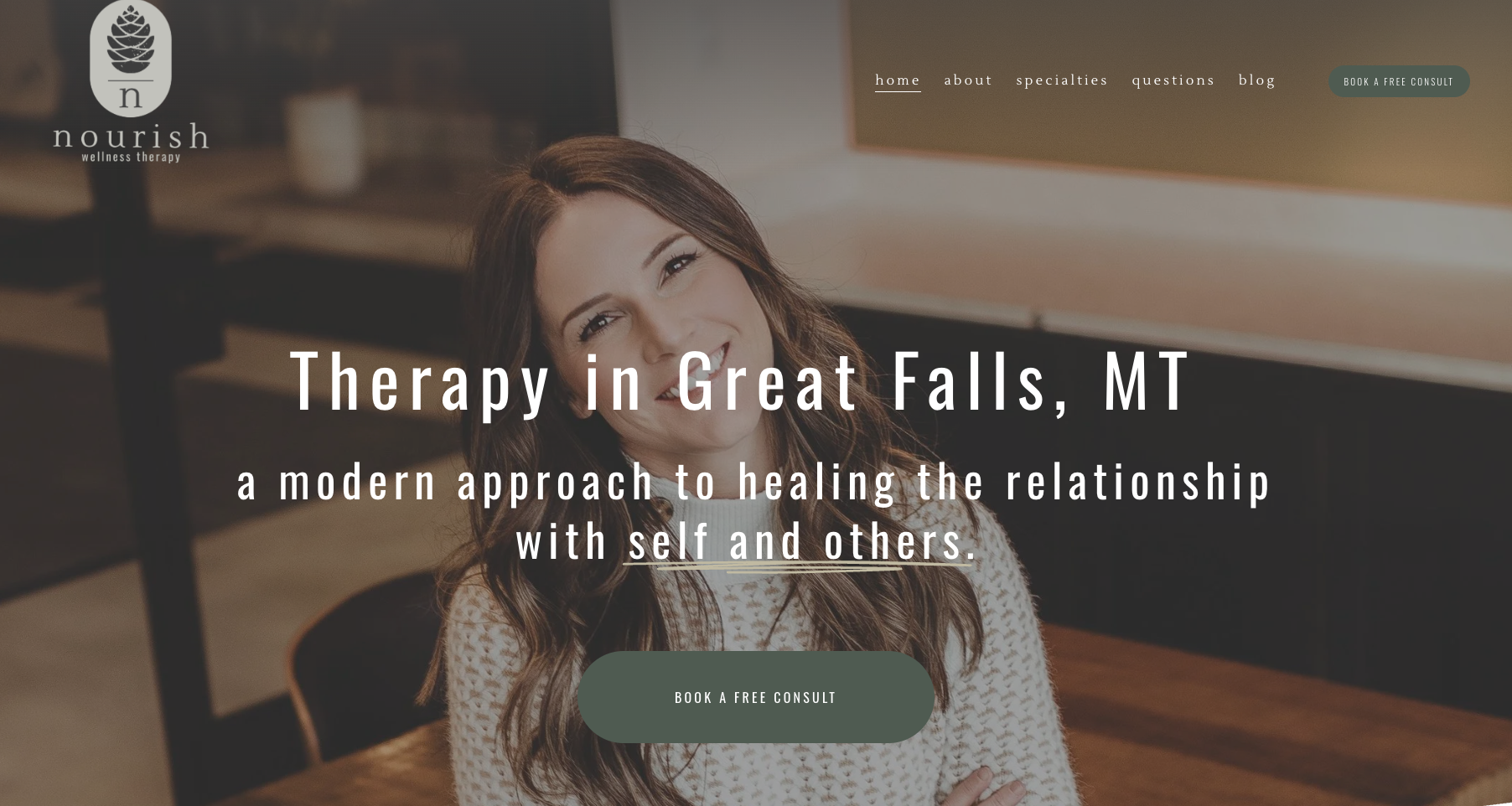
Nourish Wellness Therapy: This is an example of a website designed by the solo practice owner using squarespace. They had some wonderful headshots done and are the brand of the website. You know right away who they are and who they serve. You can DIY a website that is effective and relevant, without a website designer.
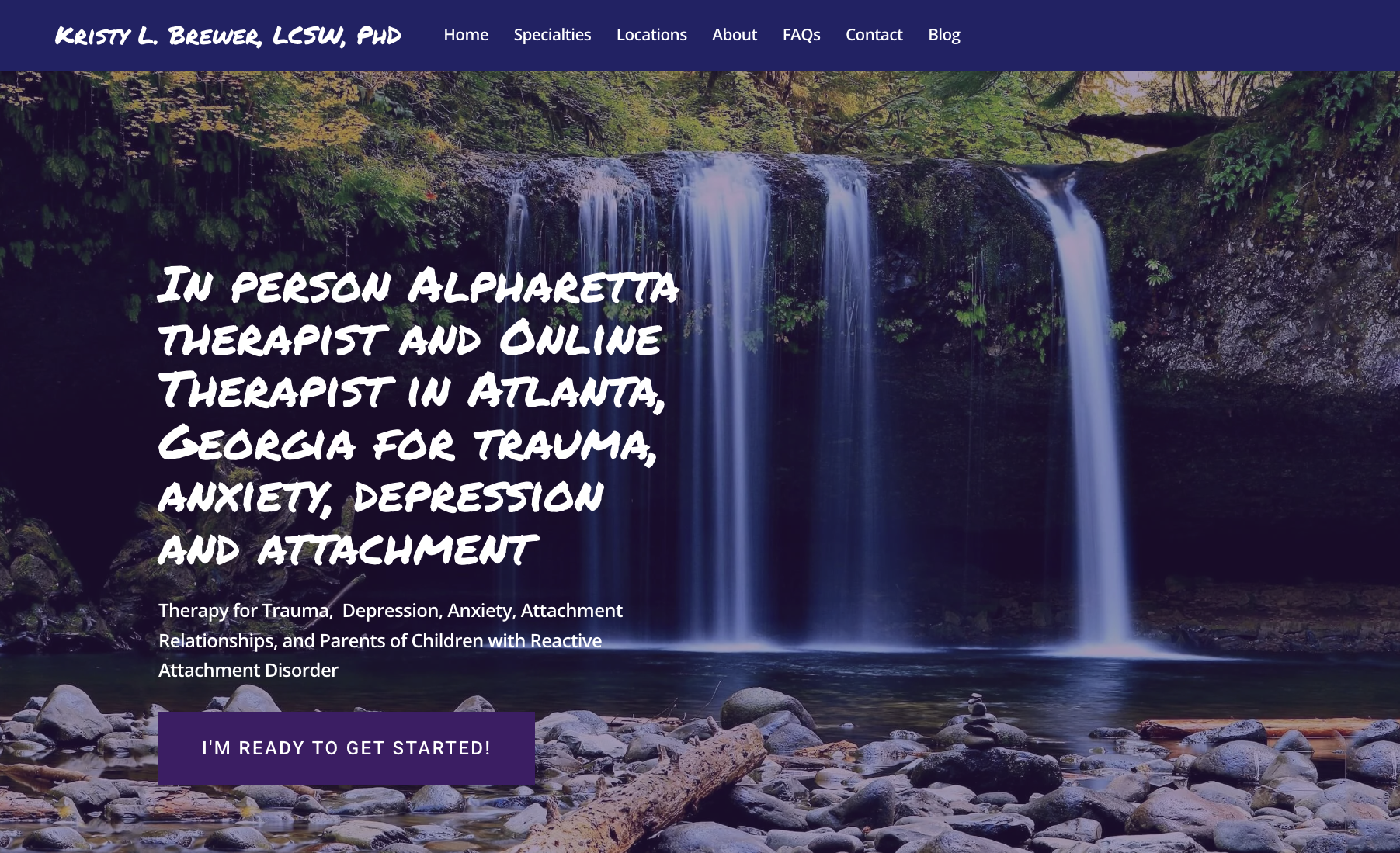
Kristy Brewer, LCSW: This solo practice owner chose to DIY their private practice website through Squarespace. They don’t need a logo, they just needed to be clear about who they serve and where they work. They are an attachment specialist who works with trauma, anxiety and depression. This website is ranked on the first page of google in their area too!
This is proof of how your website can be DIY and be effective!
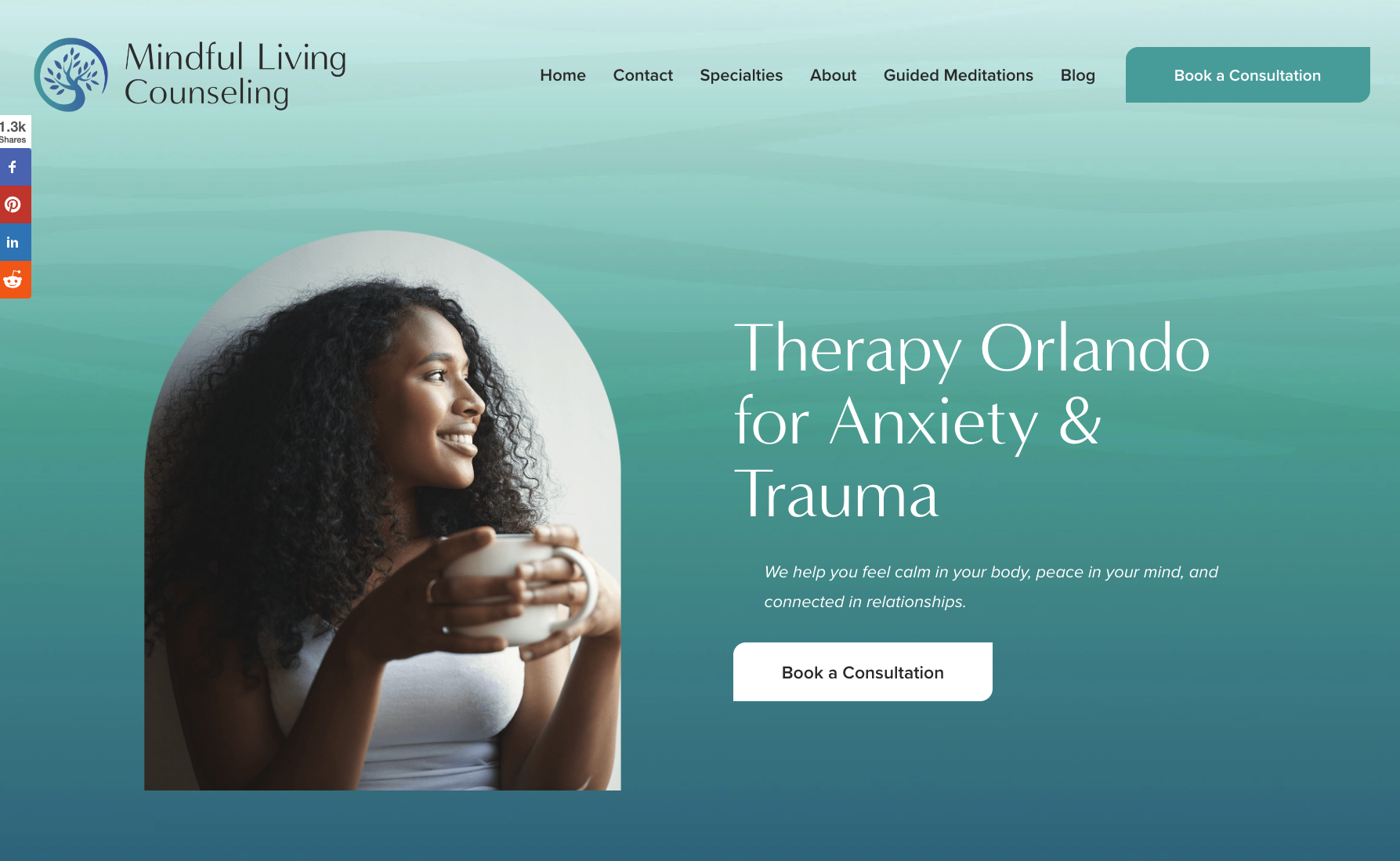
Mindful Living Counseling: An example of the best website of 2026 that started out with our template, and later got an upgrade with a web designer. This website filled up the solo practice and allowed the owner to expand into group practice, continuing to fill clinicians caseloads with ideal clients.
This website also consistently ranks on the first page of google for EMDR in the area.
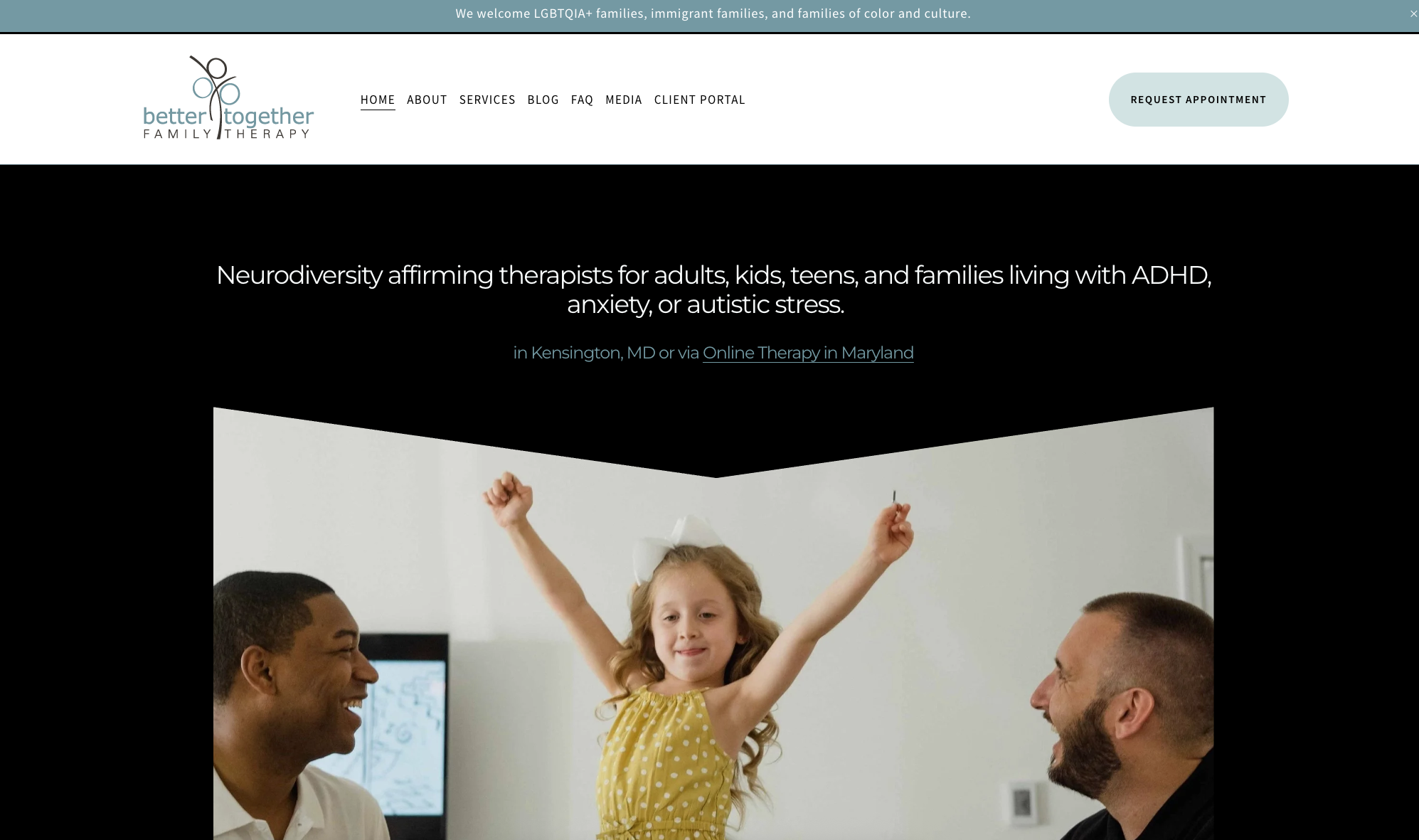
Better Family Therapy: An example of outsourcing the building and initial design of the website but with knowledge so that the private practice owner could continue to adjust and make changes on their own.
With one shift of the PROCESS of their website in regard to creating newsletters when their practice was full, they were able to fill 14 out of 20 slots for a new clinician within 2 hours!
The Complete Websites for Therapists Checklist
Use this to audit your existing site or plan a new one.
Before you build
You know who your ideal client is— specifically, not "anyone who needs therapy"
You know what problem you solveand can describe it in your client's language, not clinical language
You have a clear fee structureand are ready to post it or explain how clients can find out
You have a professional headshotor a plan to get one before launch
You've chosen your platform— we recommend Squarespace
You own your domain name— registered in your name, not a designer's
Pages and content
Home pagewith a clear headline that speaks to your ideal client's experience, not your credentials
About pagethat lets clients get to know you as a human being, not just a list of trainings
Services pagethat describes what working with you actually looks like — informed consent in action
Contact pagewith a simple form or phone number, accessible from every page
Blog capabilityset up and ready, even if you haven't posted yet
Connection and representation
Copy written to one person— not everyone, not clinicians, the specific human you want to reach
Language that sounds like you— not clinical jargon, not psychobabble, not a textbook
Images that reflect your ideal clients— in race, body, age, ability, and family structure
No assumptionsabout family structure, relationship models, spirituality, or what a "normal" life looks like
A clear picture of what therapy with you is like— visitors leave knowing what to expect
Hope woven into the copy— your ideal client should finish reading and feel like change is possible
Accessibility
Alt text on all images— every image described for screen readers
Readable font sizes and sufficient color contrast— test it, don't assume
Closed captions on any video content
Screen reader compatible— proper heading structure (H1, H2, H3) throughout
Keyboard navigable— everything reachable without a mouse
Plain languagethroughout — accessible to people with cognitive differences, reading disabilities, and non-native speakers
SEO basics
Meta title and descriptionset for every page
Your location and specialtymentioned naturally in home page copy
Mobile responsive— check how your site looks on your phone right now
Google Search Console connectedso you can track how your site performs in search
Page load speed checked— slow sites lose clients before they even read a word
Conversion
Clear call to action on every page— what do you want visitors to do next?
Contact form or phone number visiblewithout scrolling on the home page
No dead ends— every page has a next step
Easy to contact on mobile— test it on your phone
Get our free Squarespace template + step-by-step guidance
Every therapist who joins Business School for Therapists receives a free custom Squarespace template built for private practice — with structure, layout, and copy prompts already in place. No starting from scratch. No blank page panic. No expensive designer required.
Plus you'll get the training, community, and coaching to fill in every page with copy that actually connects with your ideal clients
Here are more related guides for you!
Authors: Kelly and Miranda are LMFTs, co-founders of zynnyme, and have been coaching therapists in private practice since 2010. They believe a therapist's website is one of the most important clinical and business tools they have — and that getting it right is both a practical and an ethical act. This guide has been updated regularly since it was first written to reflect the current landscape of private practice, technology, and the therapists they serve.